
LØRDAG DEN 23. JAN 2027
AUDITION
TILMELD DIG SENEST 17/1 2027
Videoaudition muligt
LÆS MERE NEDERST PÅ SIDEN
AUDITION TIL BALLETUDDANNELSEN
Audition finder sted i Tivolis Koncertsal D. 23. januar 2027
Tilmelding til audition er nødvendig:
1) Tilmeld dig først audition via Klubmodul: HER
Det er vigtigt, at du har eller opretter en bruger i Klubmodul. Profilen skal oprettes i den kommende elevs navn (ikke en forælders eller værges navn).
Når profilen er oprettet, kan du tilmelde dig auditionen.
2) Udfyld auditionformularen.
Når tilmeldingen er registreret, sender Tivoli Balletskole hurtigst muligt et link til en formular, som skal udfyldes hurtigst muligt og senest den 17. januar.
I formularen skal du:
a) Udfylde relevante oplysninger om dig selv
b) Uploade de påkrævede auditionfotos – se fotokrav
Audition består af en ballettime med tåspidsarbejde for pigerne. Efter audition vil udvalgte kandidater blive tilbudt en samtale. Samtalerne finder sted umiddelbart efter audition.
For mere information kontakt os venligst på balletskolen@tivoli.dk
AUDITION FOR
PRE-PROFESSIONAL BALLET PROGRAMME
Pre-registration is necessary. Please follow these steps for registration:
1) Register for the audition through Klubmodul HERE
It is important that you have, or create, a Klubmodul profile before registering. The profile must be created in the prospective student’s name (not in a parent’s or guardian’s name).
Once the profile has been created, you can register for the audition event.
2) Complete the audition form
After your registration has been received, Tivoli Ballet School will send you a link to an online form as soon as possible and no later than 17th of january.
Through this form, you must
a) Provide relevant personal information
b) Upload the required audition photographs – see specifications
The audition will be a ballet class with pointe work for the girls. After the audition we will invite chosen candidates for an interview. The interviews will take place immediately after the audition.
For more information, please contact us here: balletskolen@tivoli.dk
PHOTO AUDITION REQUIREMENTS
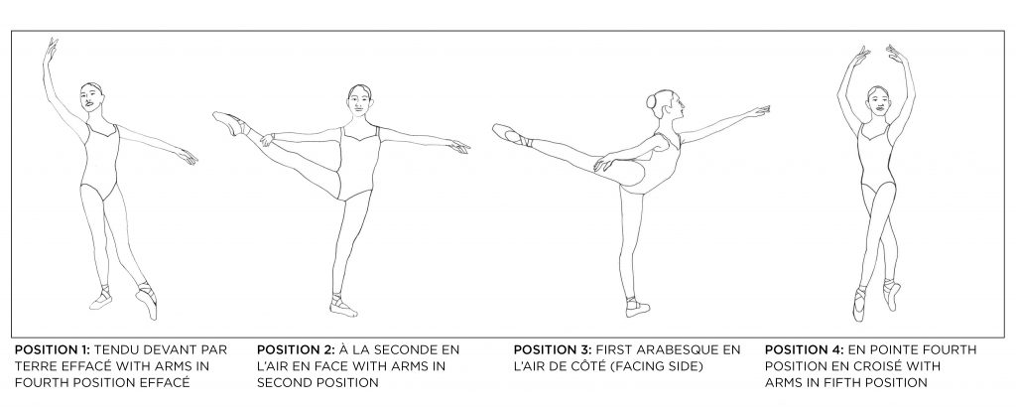
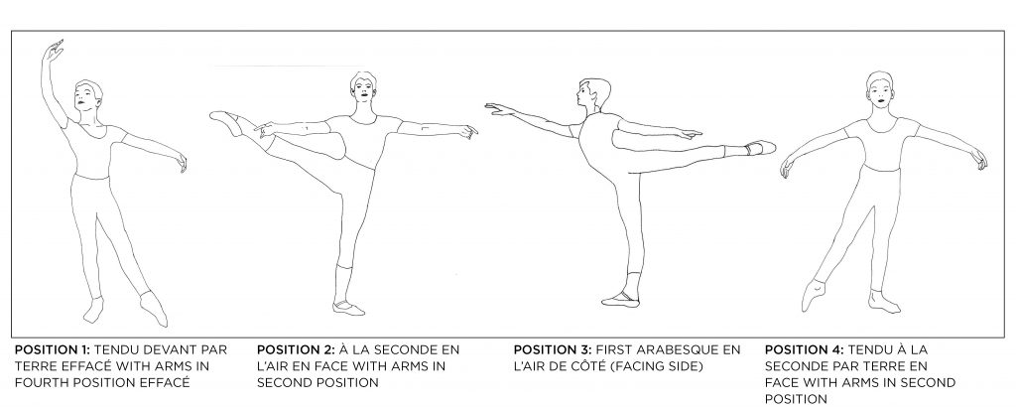
Applicants please include the following photos
FEMALE
MALE
VIDEO AUDITION
Requirements for Video Audition for Tivoli Ballet School’s Pre-Professional Program
For Ladies and Men
- Barre work: Please position the camera in front of the applicant to show FULL height and breadth in pliés and port de bras. Please position the camera halfway between front and side for all other sections of the barre work to show full range of movements.
a) pliés and port de bras
b) tendus and glissés (dégagés & jetés)
c) adage with fondus
d) grands battements and battements en clȏche - Centre Practice:
a) Battement tendu combined with battement jeté en croisé, en face and effacé, devant and derrière
b) Adage must include grands poses and a tour lent/promenade in either à la seconde or arabesque
c) Pirouettes may be from 5th, 2nd, or 4th position, must be done on the right or the left sides, en dehors and en dedans
d) Petit allegro including assembles, petit jetes and glissades.
e) Sissonnes fermés and ouvert
F) Grand allegro including grand jeté en tournant and grand jeté en avant
Men only:
a) Tour en l’air, done on the right and left sides
b) Batterie
c) Grand echappé
- Ladies only: Pointe work
a) Simple échappé relevé in 2nd and 4th
b) retiré relevé and passé relevé
c) double pirouettes from 4th position
d) diagonale of piqué turns
Optional extra: a solo variation
Video Specification:
- Please upload your video to YouTube.
- YouTube links should be included in your application form. Please ensure your link is public and not private.
- Applicants should wear soft ballet shoes, tights and a leotard/unitard.
Uploading to YouTube
- Register for a YouTube account & sign in
- Click your profile picture thumbnail in the top right corner
- In the drop-down menu, click YouTube Studio (beta)
- Click Upload Video
- Click Select Files to Upload
- Select your audition video and click Open
- Once your file has finished processing, in the dropdown menu which is in the middle, right side of the page, you can choose between Public, Unlisted, Private, Scheduled.
- Choose Unlisted
- Finish the upload by clicking Publish Once all the steps above have been completed, you may copy the link provided and paste it into the online application form.